Give a first-time visitor
a clearer way in.
The original game had a Spin button and a guided win example, but no dedicated instructions dialog. Let’s add one without rewriting the game or changing its matching rules.
Get the files.
Keep your experiment separate.
The current repository already has the completed feature. To reproduce the exercise from its original starting point, use a new clone and branch. Install Git and Node first using the setup guide.
git clone https://github.com/Adnen-Ben-Abdelaali/ai-games-studio.git ai-games-studio-tutorial
cd ai-games-studio-tutorial
git switch -c tutorial/how-to-play 42db00fc7c36f1de88c0d59d2bf965ee9056e31b
npm ci
npm run demo
npm test
Open this folder in Codex or VS Code. Use another terminal to serve the example:
npx --yes http-server@14.1.1 examples/html5 -a 127.0.0.1 -p 8080 -c-1
Open http://127.0.0.1:8080. On Windows, use
npm.cmd and npx.cmd if PowerShell blocks
the equivalent scripts.
A useful prompt
sets useful boundaries.
Copy this task brief into Codex. It describes what the visitor needs, what should change, and what must remain intact.
In this repository, add an accessible “How to play” button to the Harvest Tunisia HTML5 game. Put it beside Sound off.

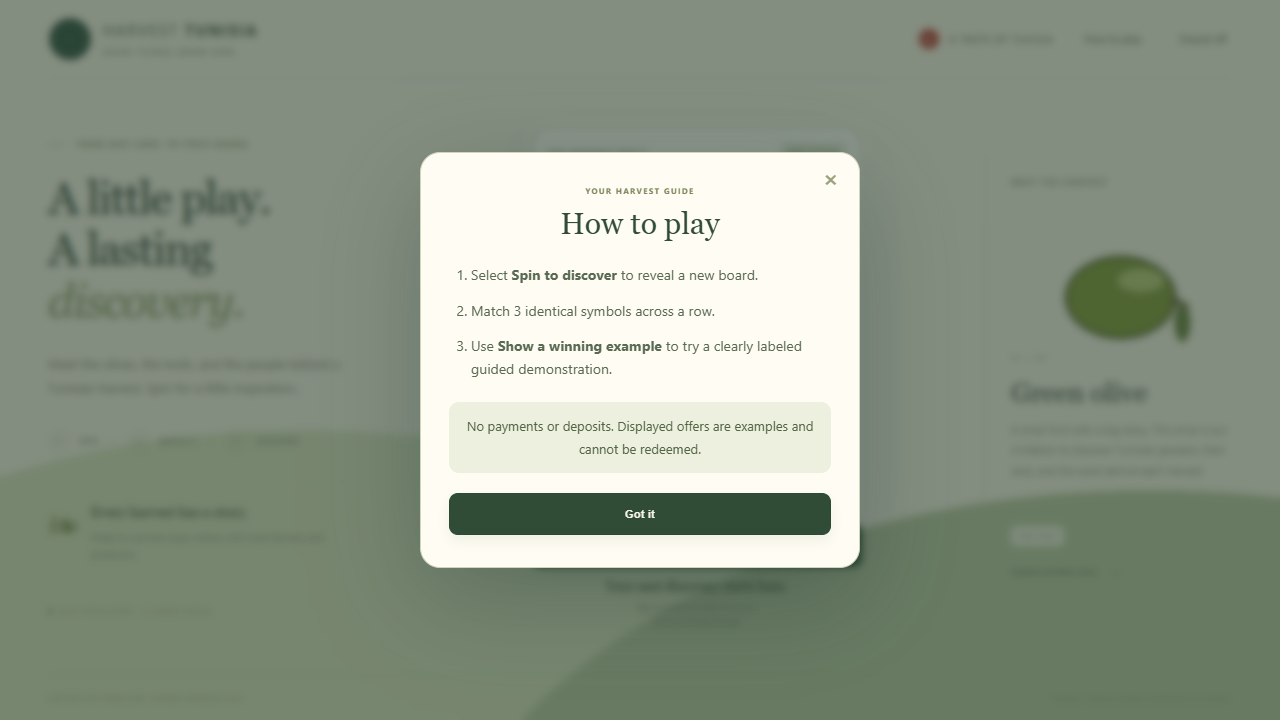
It should open a native HTML dialog with a heading, three short instructions, and a note that there are no payments/deposits and demonstration offers cannot be redeemed. Read the matching count and rule from project.template; do not hard-code three matches for every template.

Include labeled close and Got it buttons, keyboard Escape closing, and a layout that fits a 390-pixel-wide viewport. Keep the existing matching, rewards, behavior and Cocos runtime logic unchanged.

Edit the source templates in tools/, not just the generated example. Add npm run export:demo to regenerate examples/html5 from the existing seeded sample without replacing its project edits.

Regenerate the browser example, run the existing tests, and show the code diff. Verify the dialog opens, closes, returns focus, and fits a mobile-sized viewport.
Why this works: the prompt names the user problem, limits the change, points to the actual source, and asks for checks you can observe. Codex may format its solution differently; review the result rather than expecting identical text.
Real markup.
A small amount of logic.
| Source file | What changed |
|---|---|
tools/harvest.html |
A button, named native dialog, instruction list, and close controls. |
tools/harvest-player.js |
Template-derived copy and open/close handlers. |
tools/harvest.css |
Responsive dialog sizing, spacing, and visible focus. |
scripts/export-demo.mjs |
A repeatable way to regenerate the saved sample’s HTML5 output. |
The rule comes from the model.
$('#help-rule').textContent = project.template.kind === 'anywhere'
  ? `Match ${project.template.matchCount} identical symbols anywhere on the board.`
  : `Match ${project.template.matchCount} identical symbols across a row.`;

$('#how-to-play').onclick = () =>
  $('#how-to-play-dialog').showModal();

$('#close-help').onclick = $('#understood').onclick = () =>
  $('#how-to-play-dialog').close();
textContent writes plain text. The matching rule
still comes from the saved template. The game’s random results and
matching evaluator are unchanged.
Appearance is a start.
Behavior is the test.
npm run export:demo
npm test
git diff
Reload the cache-disabled game server. The new command rebuilds HTML5 from an existing sample; it doesn’t overwrite its saved model or update the native Cocos scene.
- Open the dialog with the new button, then close it with Escape.
- Check that focus returns to How to play; press Enter to open it again.
- Close it with Got it. Confirm the matching count reflects the sample’s rule.
- Try a narrow viewport. Check the whole dialog fits and its content can scroll.
- Try the existing guided winning example and run the six existing model/rule tests.
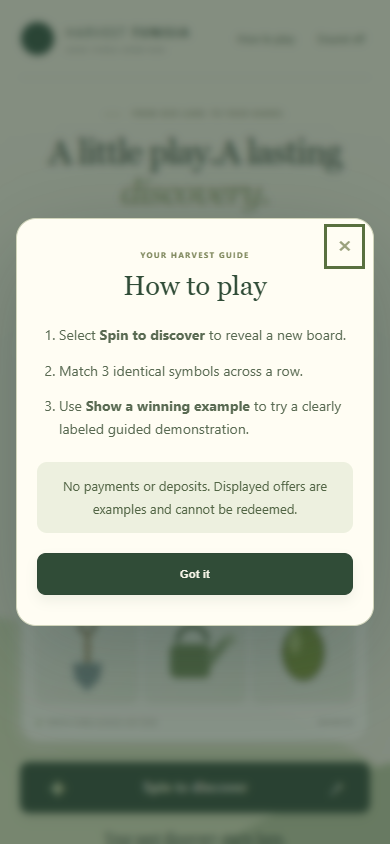
The tutorial’s local checks passed, including the guided win. If
the new button appears but does nothing, reload the generated
JavaScript too: an older cached game.js can make a
new interface appear broken.
Now make the guide
speak to your audience.
Try this next: “Change only the help heading and instruction text into French. Preserve semantic labels, the rule-derived count, Escape/close behavior, and existing gameplay. Regenerate the example and show the diff before publishing.”
This lesson is a source-file edit. It doesn’t automatically create UML nodes. For model-driven edits, Studio’s supported behavior cards, diagrams, code literal, and Codex MCP use a shared saved model.
Explore the linked behavior workflow ↗